
Lega Release Notes - May 2026
This release brings real-time visibility into how apps work through complex requests, a new approval step for sensitive tool calls, and a structured document review capability. It also includes a series of quality-of-life improvements across the prompt editor, document generation, and user registration.
Feature availability
Most features in this release are enabled by default and will be active in your instance as part of your next update. Human-in-the-Loop Approvals and Tabular Review are disabled by default and available on request. To enable them, submit a support ticket or contact your Customer Success Manager.
⭐ Spotlight Features
With this release, Lega apps work more transparently. Complex requests now show their steps in real time, sensitive tool calls can be held for your sign-off, and a new document review tool replaces the manual work of reading files individually and reconciling results.
Parallel Tool Execution and Task Progress Checklist
Apps with two or more tools now break requests into steps, run independent steps in parallel, and surface a live checklist in the chat as they work. Each step is named, timed and checked off as it completes. The final response is clean and consolidated. You can now see exactly how it was built.
This is enabled automatically for any app configured with two or more tools. No setup is required. Learn more here.
Human-in-the-Loop Approvals Preview
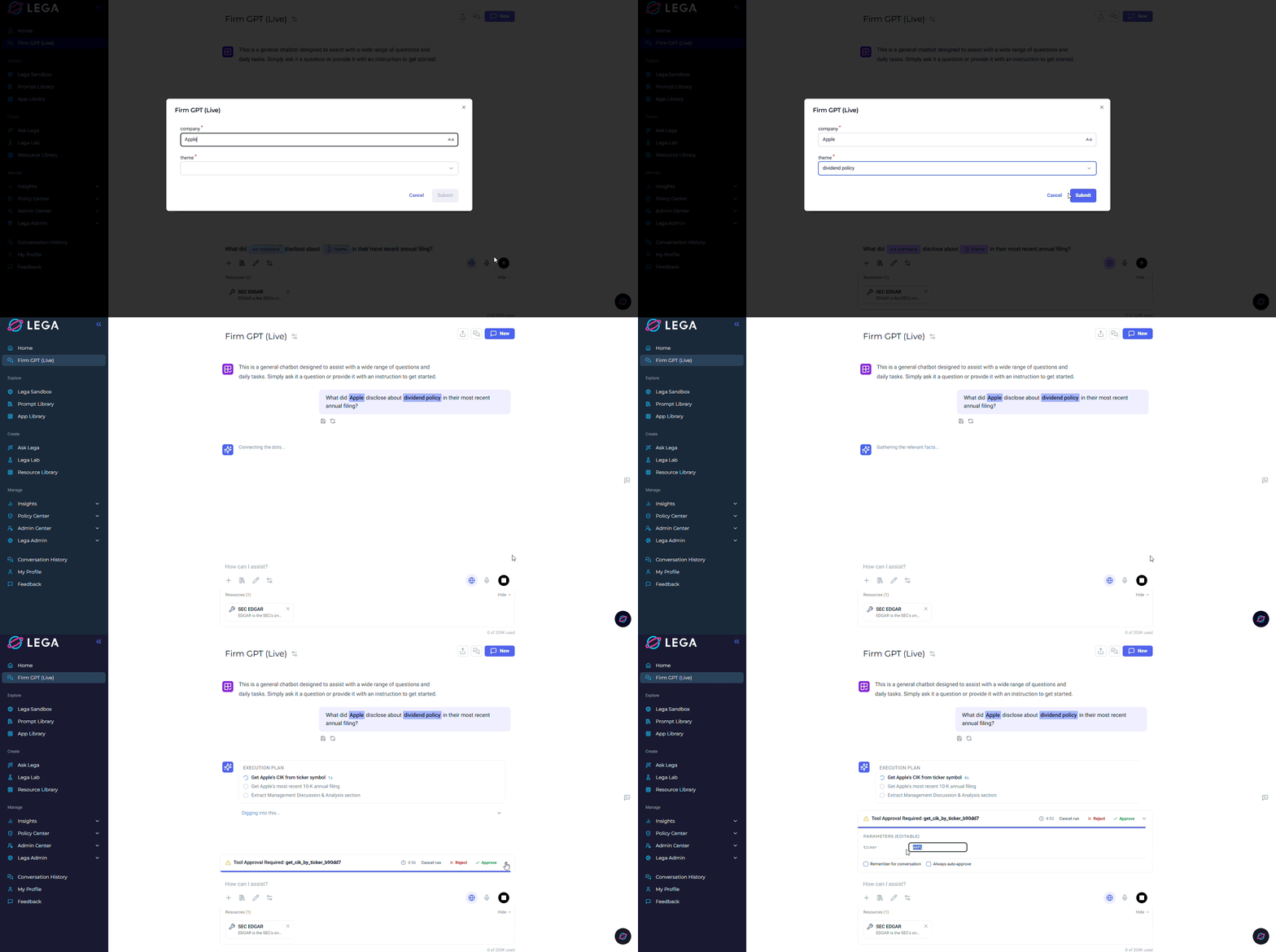
Some tool calls shouldn't run without your approval. For workflows that touch external systems, generate documents, or take actions that are hard to reverse, you can now require explicit sign-off before anything executes.
When approval is enabled for a tool, execution pauses and a drawer expands in the chat showing exactly what the AI is about to do and what parameters it will use. You can edit the arguments, then approve or reject before anything proceeds. Save your preference once and it won't ask again for that tool, though every decision is recorded in the audit log either way.
Admins control which tools require approval, set timeout windows, and manage group-level settings. The feature is off by default. Contact your Customer Success Manager to get it configured. Learn more here.
Tabular Review Preview
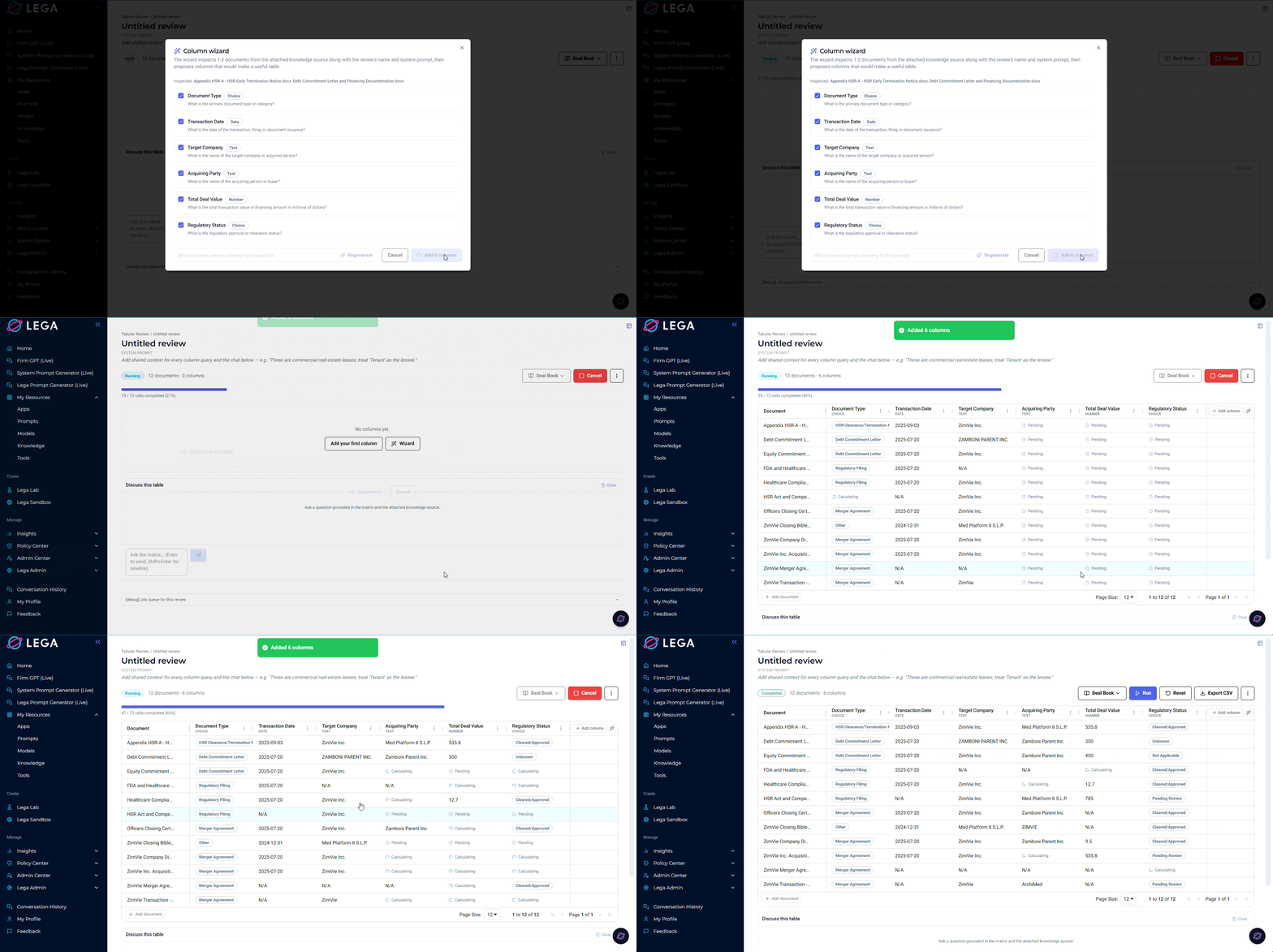
Reviewing a set of documents for the same information (dates, obligations, risk factors, defined terms) has always meant reading each one individually or running the same query repeatedly and reconciling results by hand. Tabular Review replaces that loop.
Attach your documents, define what you're looking for with typed columns (text, number, date, boolean, citation), and run. The platform queries every document against every column and streams results into a matrix in real time, with each cell linking back to the source text that grounded it. From there you can sort, add documents or columns, and ask follow-up questions in a chat interface that sits alongside the full matrix.
Contact your Customer Success Manager to get access. Learn more here.
🔍 Also in this release
Meta-Lega MCP Server
Lega now exposes its own capabilities as tools, giving apps self-knowledge. Apps can look up what other apps exist, search knowledge sources, and draw on the platform's own configuration, making interactions more context-aware without any extra setup. The internal layer is available to all users in this release. External MCP access (Claude Desktop, Cursor, and similar clients) is scoped to a future release.
Prompt Editor Improvements
Three targeted updates to the Prompt Editor:
- Prompts can now be renamed inline without opening a separate dialog. The new name updates everywhere the prompt appears.
- New prompts can be started from a template, opening the editor pre-filled and saving as a new prompt distinct from the template.
- The editor now clearly separates create and edit modes, with appropriate save behaviour in each to prevent accidental overwrites.
Save Output as Prompt
Any model response can now be saved directly to the prompt library, not just your own messages. Click the save action on any response in chat, give it a name, and it becomes a first-class prompt in the library with the same controls for parameters, sharing, and naming as any other. Parameters present in the response are preserved.
Share conversation
User-Specified Filenames for Generated Documents
Self-Registration with Admin Approval
When self-registration is enabled, new signups are now held in a pending state until an admin approves them via Admin > Users. Approved users receive an email notification when email is configured.
Groups can be configured with an auto-approve window: a time-bound setting that activates signups automatically during a defined period, useful for workshops and managed onboarding events where frictionless access is needed without permanently relaxing approval requirements.
🛠️ Platform Improvements
- Provider-specific customisation. Improves how the platform handles model-specific constraints, resulting in fewer unexpected errors when working with providers that have specific parameter requirements. Also adds standardised support for provider-native web search across OpenAI, Anthropic, and Gemini.
Last updated June 1, 2026